
Last Updated on June 9, 2017 by Ritwik B
In Google Adwords, many times you might have noticed that a search query matches one or more keywords in a different ad group. This results in AdWords showing different ads, not as we expect it to do.
Only one keyword can trigger an ad per search term & AdRank is its deciding factor.
The AdRank which is calculated during auction time may differ depending on your bid & Quality score of a keyword. There is nothing much you can do other than adding negative keywords to your campaigns/ad groups.
What if you are having like 100s & 1000s of campaign/ad groups/keywords??.
No worries..!!
With this Adwords Cross Matching Keywords Script, you can now add keywords from one Campaign(s)/AdGroup(s) as negatives in other Campaign(s)/AdGroup(s) in seconds.
There is a lot you can do with this script like copying keywords from;
- One campaign & add as negatives to other Campaign/Adgroup
- Multiple campaigns & add as negatives to multiple Campaigns/AdGroups
- Multiple AdGroups & add as negatives to multiple Campaigns/AdGroups
- and more
I’ll explain some of the use cases but before that, you can preview the script & open the Keywords Cross Matching Spreadsheet.
So. Lets start
Adwords Cross Triggering Keywords Spreadsheet
Follow these Steps:
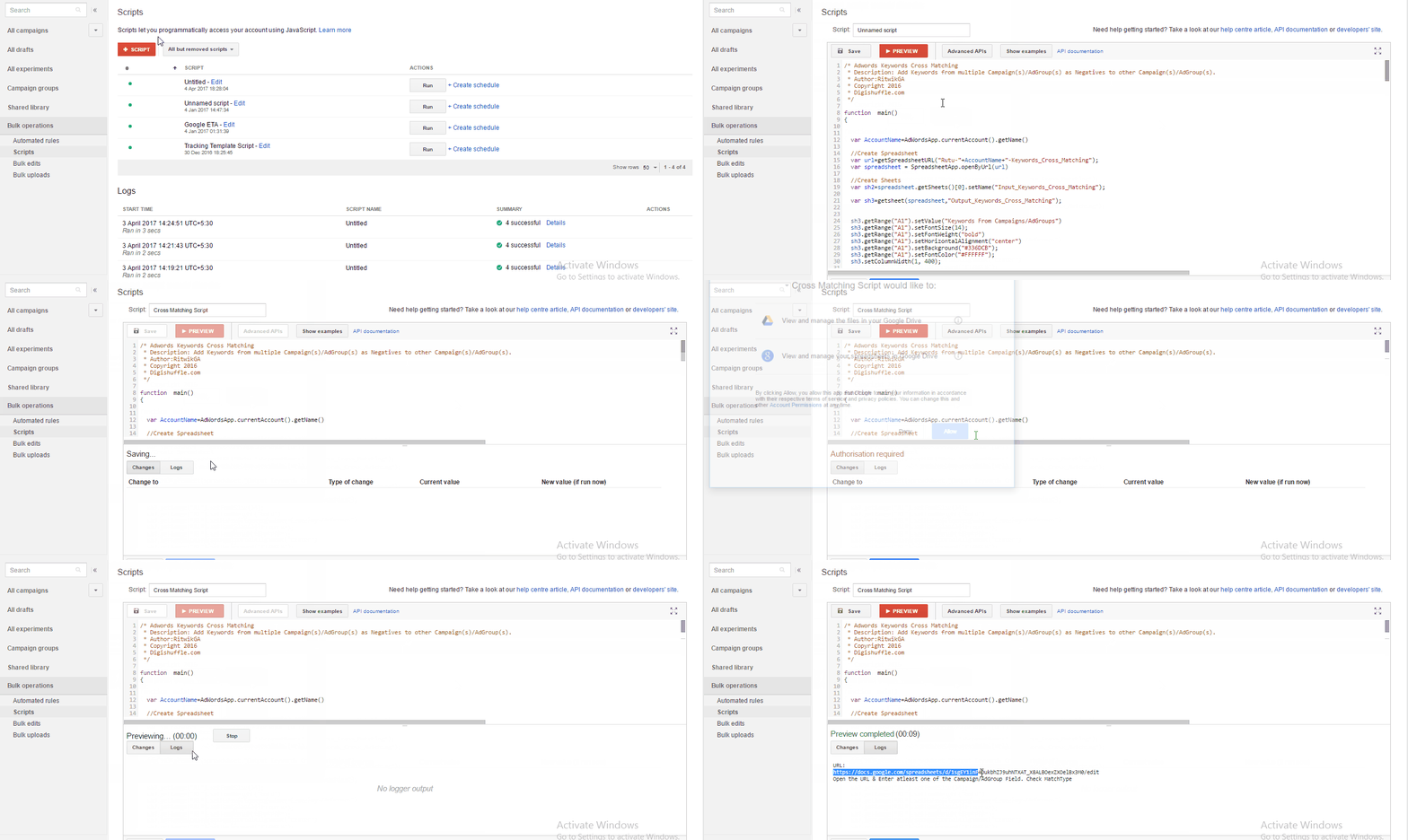
- Paste the script in the AdWords script editor.
- Complete the authorization process > Click Preview.
- Open the spreadsheet URL in the logs
- If you are new to scripts, check How To Run Adwords Scripts.
(Click Below gif to Enlarge)
Understanding Spreadsheet:
- You’ll open the spreadsheet with 2 sheets
- Input_Keywords_Cross_Matching
- Output_Keywords_Cross_Matching
Input_Keywords_Cross_Matching Sheet:
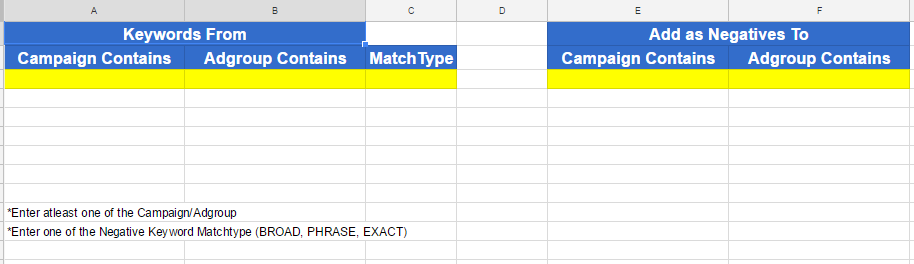
- Keywords From –
- Campaign Contains: Campaign(s) from which the keywords would be fetched & added to other Campaigns/AdGroups as negatives.
- AdGroup Contains: AdGroup(s) from which the keywords would be fetched & added to other Campaigns/AdGroups as negatives
- Entering Both will AND these conditions
- Match Type: Match Type of the keywords to be added as negative keywords.
- Keywords To –
- Campaign Contains: Campaign(s) to which the keywords would be added as negatives.
- AdGroup Contains: AdGroup(s) to which the keywords would be added as negatives.
- Entering Both will AND these conditions
Output_Keywords_Cross_Matching
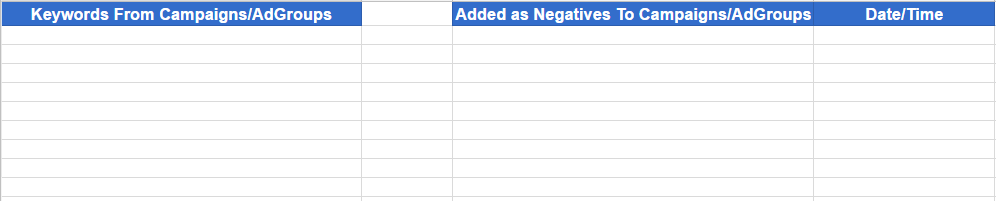
- On clicking Preview script, it will display the changes that would take place after you run the script
- The name of the respective Campaigns/AdGroups would be displayed.
- Check more in below scenarios.
Adwords Cross Matching Keywords – Scenarios
Scenario #1 – Avoid Cross Matching Keywords within AdGroups of a Campaign.
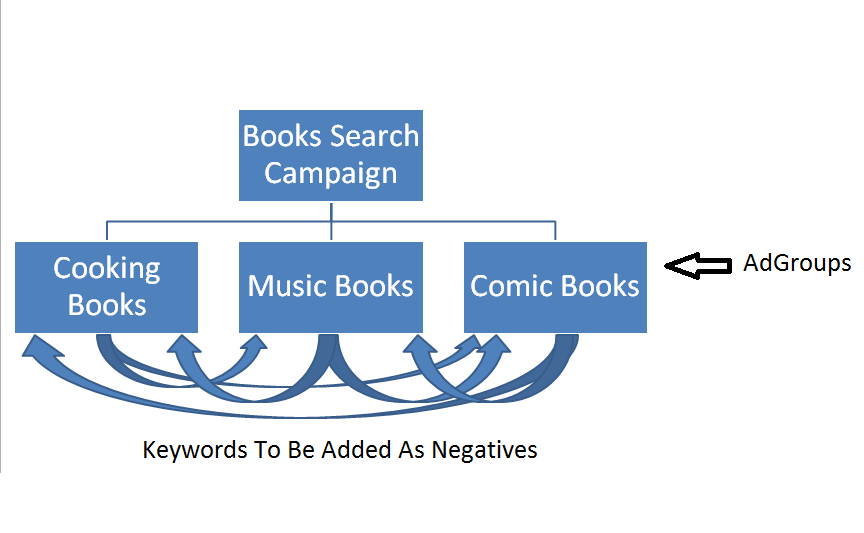
Here I have the following Campaign/AdGroups setup
- Books_Search_Campaign
- Cooking Books
- Music Books
- Comic Books
I want to add keywords from
- Cooking books as negatives to Music & Comic books.
- Music books as negatives to Cooking & Comic books
- Comic books as negatives to Cooking & Music books.
- I have entered the conditions in spreadsheet as
- Keywords From
- Campaign contains: ‘Books_Search_Campaign’
- AdGroup contains: ‘Books’ (select all ad groups within the campaign)
- Keywords To
- Campaign contains: ‘Books_Search_Campaign’
- AdGroup contains: ‘Books’ (select all ad groups within the campaign)
Note: Keywords will not be added as negatives to itself (AdGroup/Campaign) in any case.
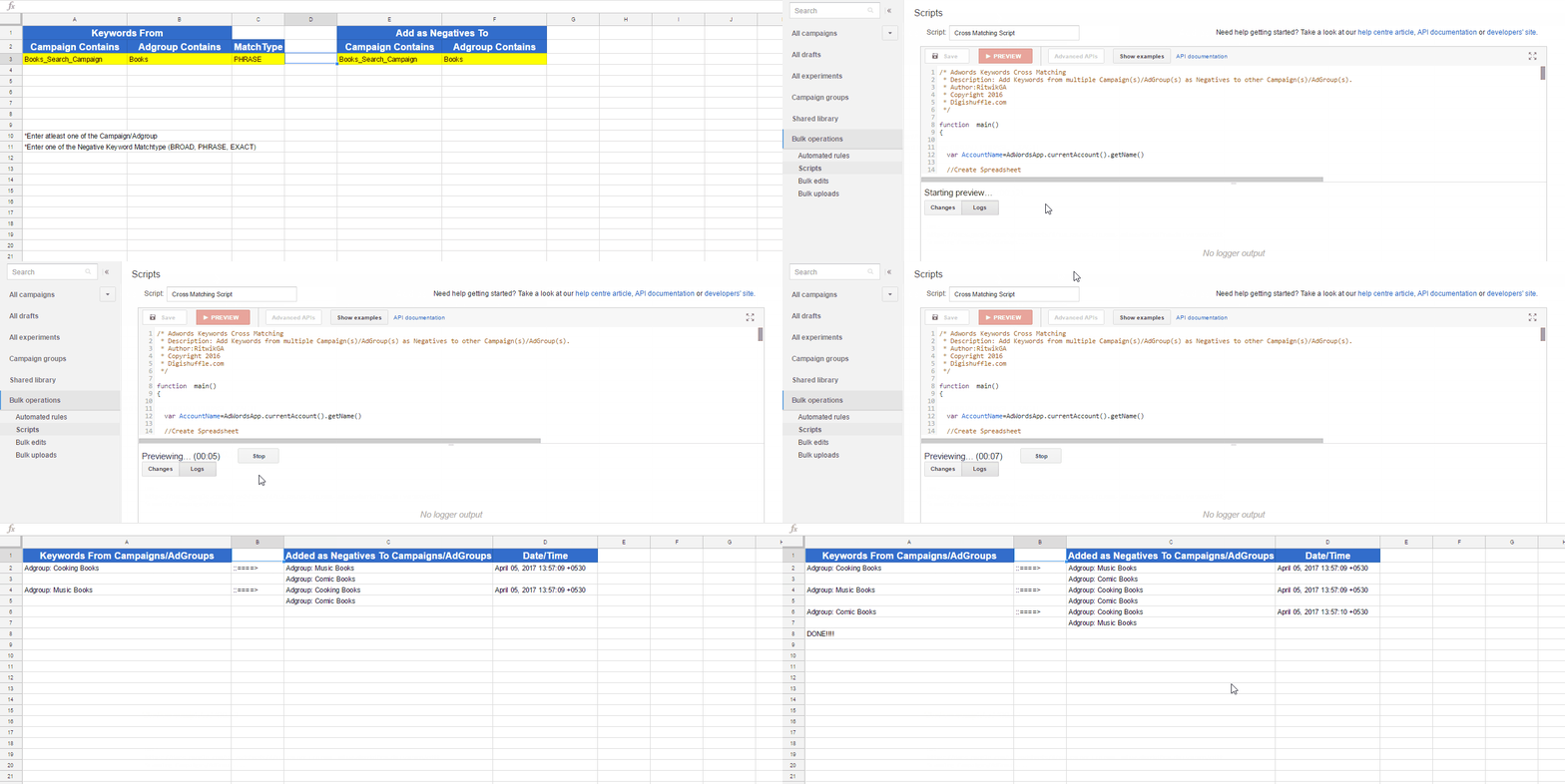
- Preview the Script > Check the sheet ‘Output_Keywords_Cross_Matching’.
- You’ll get the list of AdGroups from which the keywords would be added to other respective AdGroup(s), as per the condition.

(Click on gif to Enlarge)
- Also, you can check the keywords which will be added to respective AdGroup(s) in the changes tab, with the selected match type.
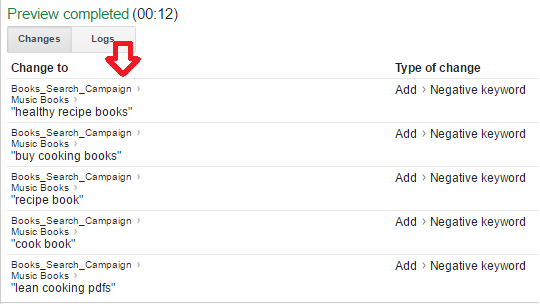
- Now everything seems fine & we can Run the Script.
The changes will only be made after running the script.
So before that, you can experiment on the ‘Input_Keywords_Cross_Matching’ sheet & check the changes that would be made in ‘Output_Keywords_Cross_Matching’ sheet.
Scenario #2 – Avoid Cross Matching Keywords within Different Campaigns.
Here I have the following Campaigns setup
- Shoes_Polish_Search_Campaign
- Shoes_Search_Campaign
- Shoes_Stand_Search_Campaign
I want to add keywords as negatives from
- Shoes_Polish to Shoes_Search & Shoes_Stand Campaign
- Shoes_Search_Campaign to Shoes_Polish & Shoes_Stand
- Shoes_Stand to Shoes_Polish & Shoes_Search
I have the inputs for conditions as
- Keywords From Campaign which contains ‘Shoes’
- Keywords To Campaigns which contains ‘Shoes’
- Now Click Preview
Remember: Keywords will not be added as negatives to itself (AdGroup/Campaign) in any case.
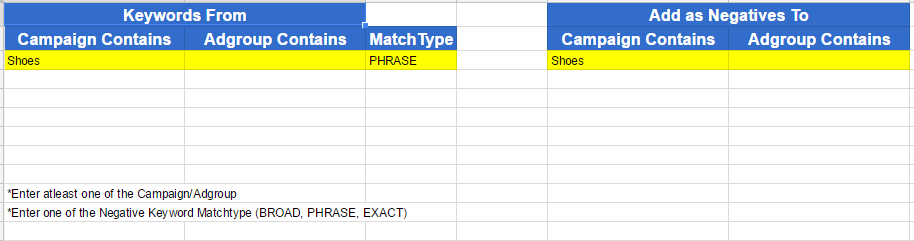
- The ‘Output_Keywords_Cross_Matching’ sheet will show as

- Everything seems fine & now I can Run the Script.
Scenario #3 – Avoid Cross Matching Keywords between AdGroups & other Campaigns.
Here I have the following Campaigns/AdGroups setup
- Books_Search_Campaign
- Comic_Books (AdGroup)
- Remarketing_Search_Campaign
- Remarketing_Display_Campaign
I want to add keywords as negatives from
- Comic Books (AdGroup) to Remarketing_Search_Campaign & Remarketing_Display_Campaign
I have the inputs for conditions as
- Keywords From
- Campaign contains ‘Shoes‘
- AdGroup contains ‘Comic_Books‘
- Keywords To
- Campaigns contains ‘Remarketing‘
- Now Click Preview
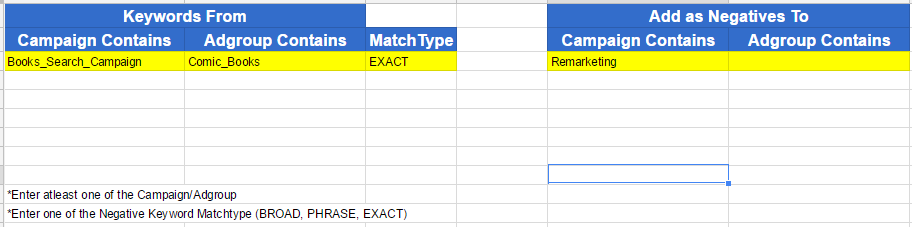
- The ‘Output_Keywords_Cross_Matching’ will show

- Now Run The Script
While adding keywords from AdGroups as negatives to other Campaigns, it will add at AdGroup level of selected campaigns.
Summary
- The keywords will never be added as negatives to itself, in any condition (Campaign/AdGroups)
- Check the conditions for Campaign(s)/AdGroups(s) in the input sheet to see if the output is as expected in the output sheet.
- Enter the proper MatchType. Check to know more about Negative Keywords MatchTypes.
- Do Try combinations such as
- Keywords from Campaign contains ‘search’ to Campaign ‘search’, to add negatives to all search campaigns.
- Keywords from Campaign contains ‘display’ to Campaign ‘display’, to add negatives to all display campaigns.(if keyword targeting)
- Check the logs if you encounter any error. (No such campaigns, cannot add negatives to itself, etc)
hey Ritwik, once i try i always get an error Parsing error. Please check your selector. (line 118)
do you think something can help?
Thanks @maximasem:disqus for pointing it out!! I have corrected some minor errors. You can retry now.
It works great now! Thanks! I was looking for such stuff for a long time, and found that 🙂 you are the best!