
Last Updated on October 8, 2026 by Ritwik B
I’ll explain one of the ADVANCED methods to track Facebook Reactions, Comment & Share in Real Time in Google Analytics. These events will take place on the Facebook platform.
The setup will take less than 5 min & you’ll be ready in no time.
Let’s take a look at the awesome features.
- Track Like, Emoticons, Comment & Share in Google Analytics & Google Sheets.
- Track Multiple Pages With All Posts.
- Track Comments in Google Sheets.
- Create Live Dashboard in Google Sheets.
- Track Your Top Fans (DIY Top Fan Badge) (Users who like, share, comment more often)
- Track Most Engaged Posts.
- & more…
Also, you can comment & suggest more use cases as we will have RAW data logs imported to the sheets. Here’s a small glimpse of what it’ll look like:
#1 Tracking Facebook Page Feed Events In Google Sheet
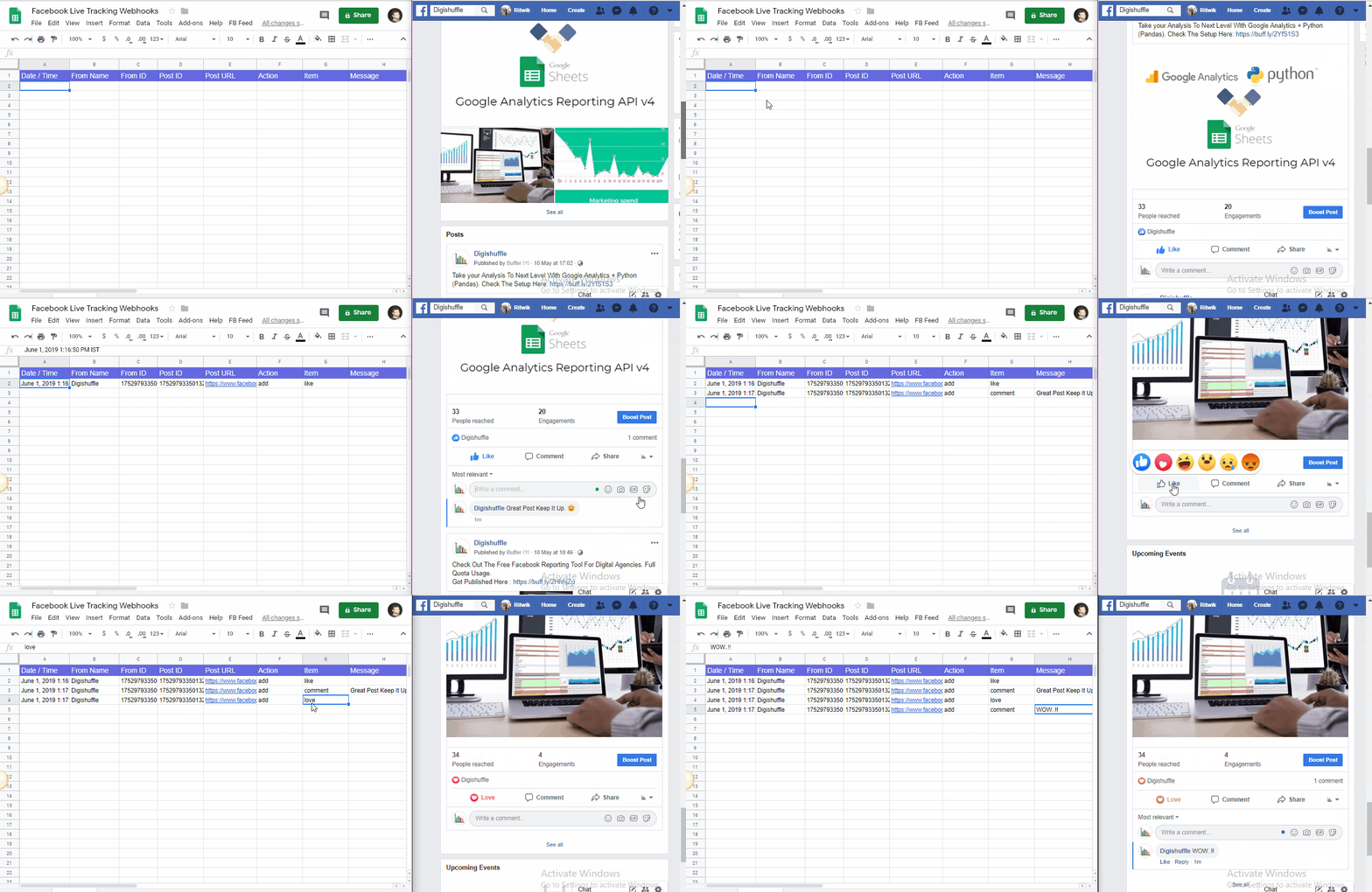
To get more customized reports you can even use sheets as the RAW events data will be logged in it.
Google Sheets Integration:
The columns that will get captured are
- Date / Time
- From Name
- From ID
- Post ID
- Post URL
- Action
- Item
- Message
- Parent Comment Id
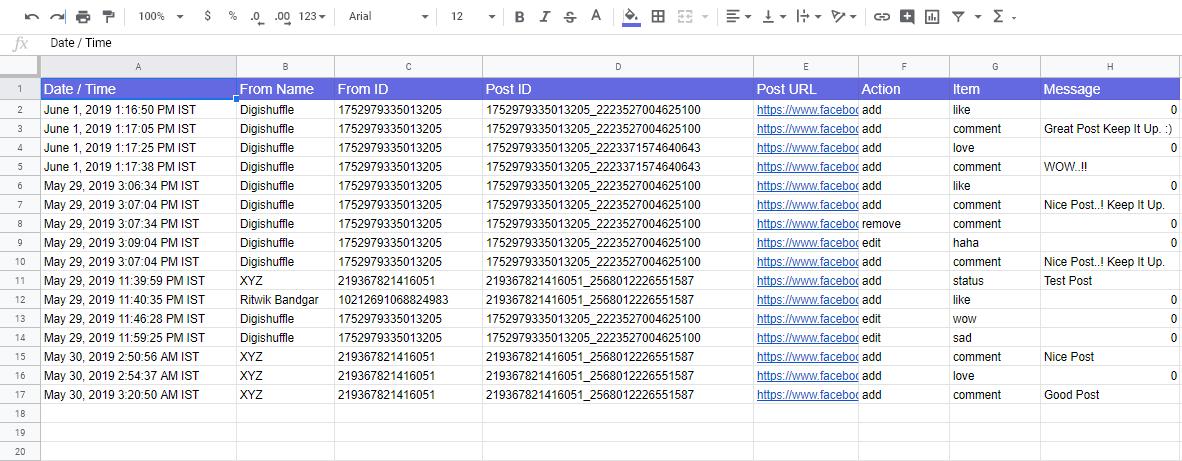
As you can see, by using pivots & filters you can slice & dice the data & also create live dashboards.
I won’t be deep diving into use cases now (maybe that’ll be for a later post). So let’s get started with the setup.
Step By Step Method To Track Facebook Page Feed Events in Google sheets.
Step 1: Setup webhook to capture Facebook Page Feed events.
Create a webhook URL
- Open this Google Spreadsheet. Click on File > Make a copy.
- Click on Extensions > App Script.
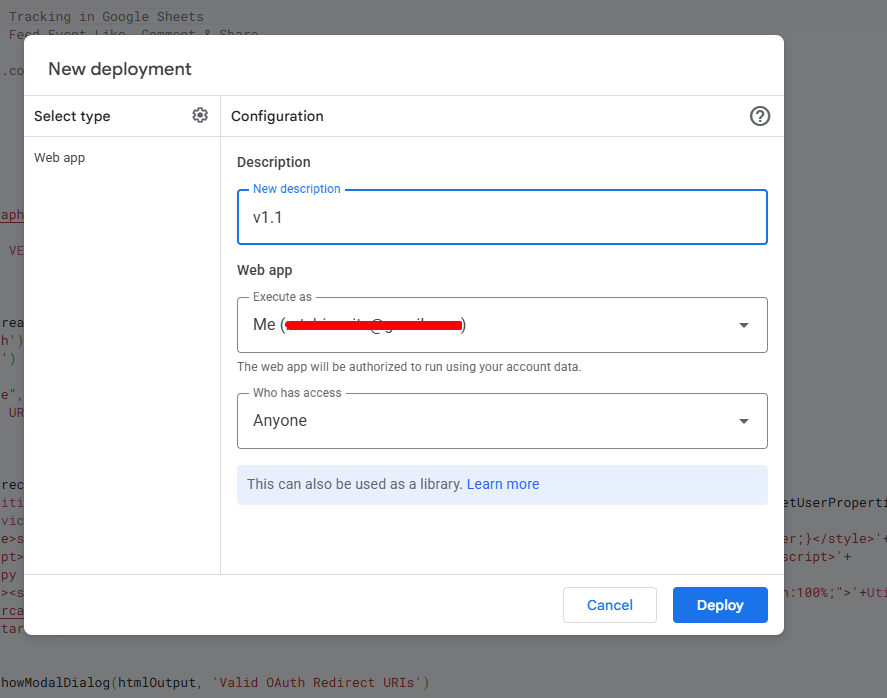
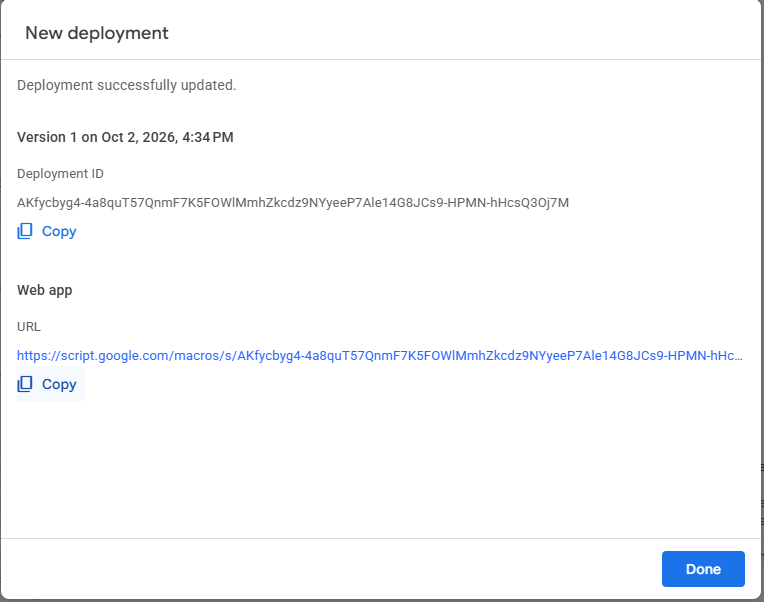
- Click on Deploy (at top right) > New Deployment > Click Deploy
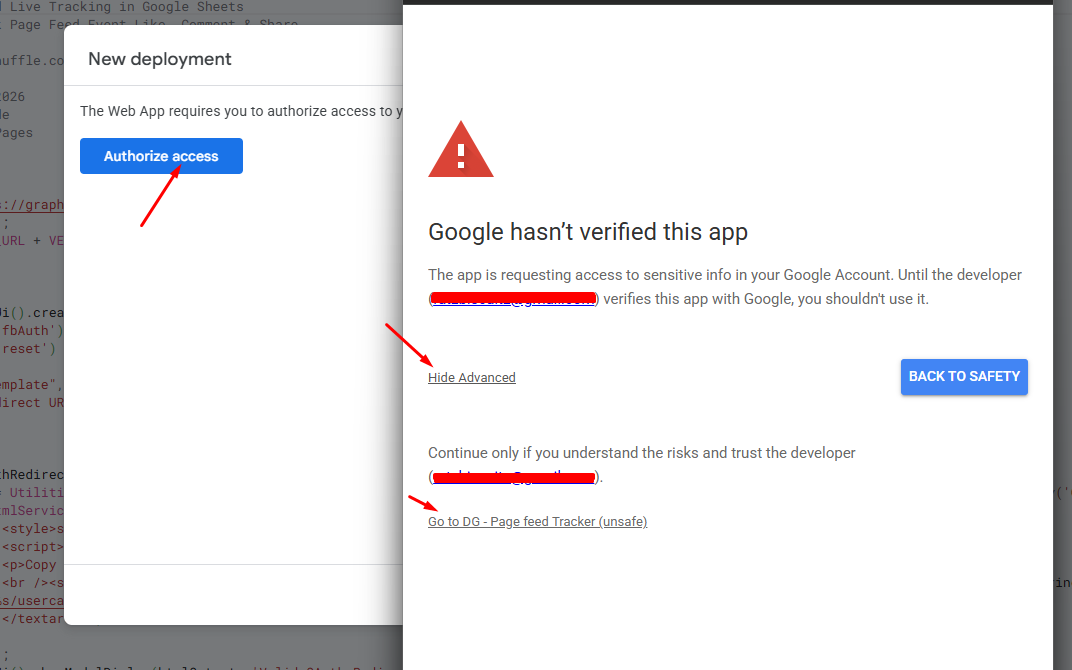
It will prompt you to authorize the access, so simply click on it and complete the authorization flow as shown below.
If everything works, you’ll get a Web App URL. Copy it and store it.
Create Facebook App
- Go To Facebook Apps Page: https://developers.facebook.com/apps/
- Click Create New App:
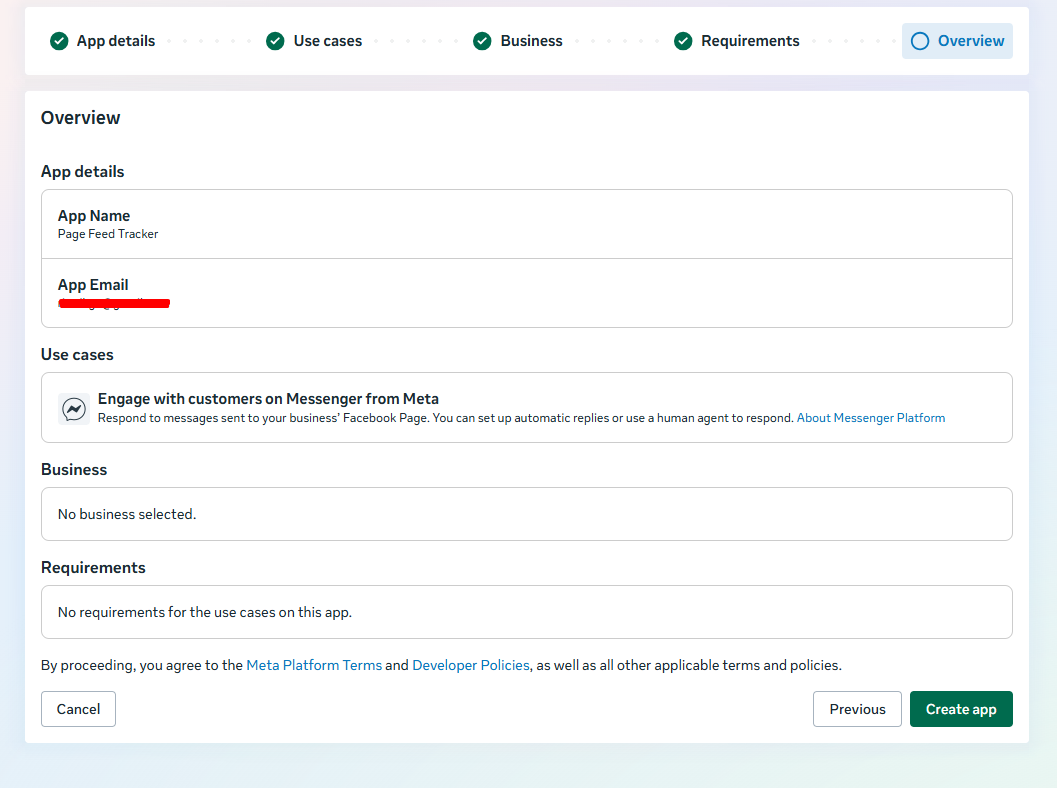
- Enter App Name ‘Page Feed Tracker’ (you can name anything).
- Use case as “Engage with customers on Messenger from Meta”.
- Business (If you have you can link or just select no business).
- Your final step should look like as shown below
- Click Create app
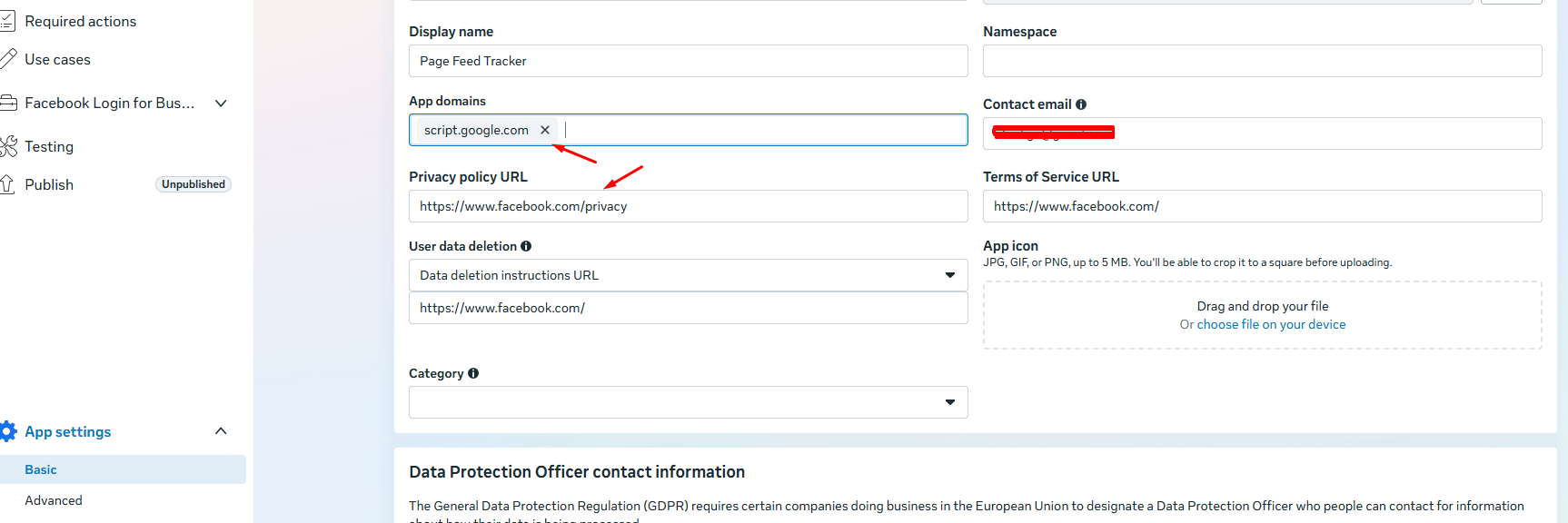
- Go To App Settings Page > Basic & fill the following fields
- App Domains: script.google.com
- Privacy Policy URL: Enter the URL from your website.
- Scroll below & click on save changes.
Subscribe to Facebook page feed webhook events.
- Click on Use cases.
- Click on “Customize” in the Engage with customers on Messenger from Meta use case.
- Click on “Add more to this use case” and then click “Add” on webhooks.
- You can now go to Webhooks > Page > Paste the Web App URL in Callback URL and verify token as “test” (or anything will work)
- Click on verify and save
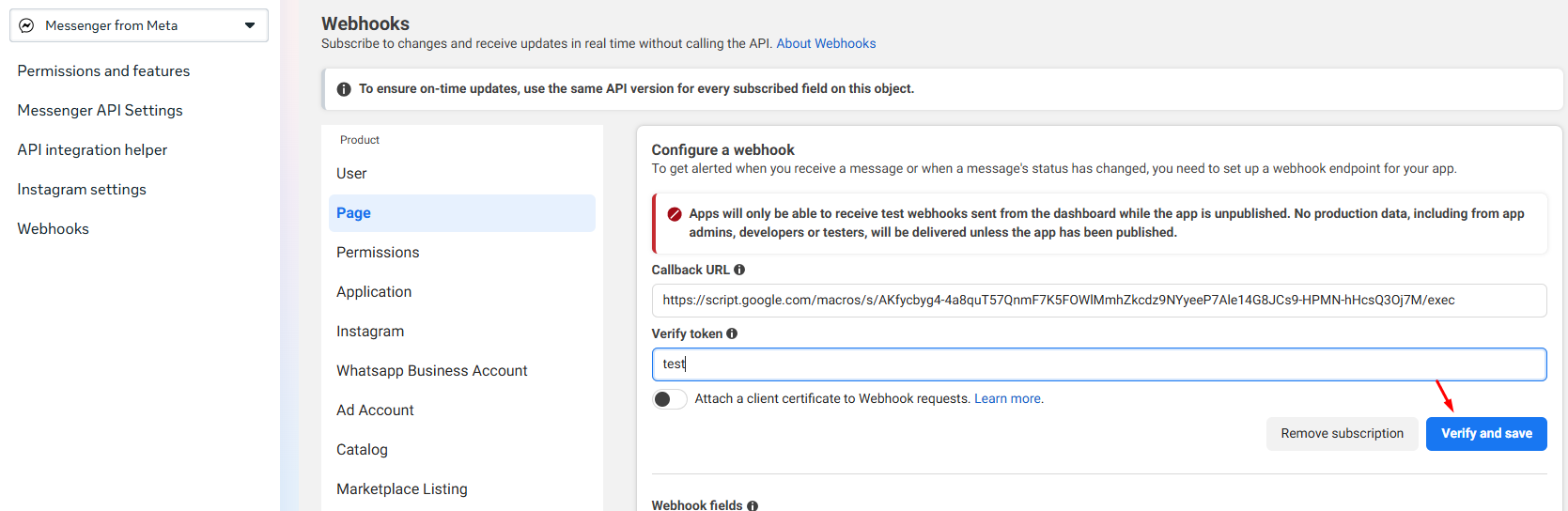

After that, you can scroll down and turn the “feed” option On.
Step 2: Start capturing the actions in google sheets
- Open the Google sheets which we copied earlier (DG Page feed tracker).
- Click on FB Feed > Start
- Enter the App id and App secret found in App settings > Basic as shown in the image below.
- Sheet Name is the name of the sheet where the logs will be imported. (default is the current sheet)
- Spreadsheet id is the id of the current spreadsheet.
- Click Save

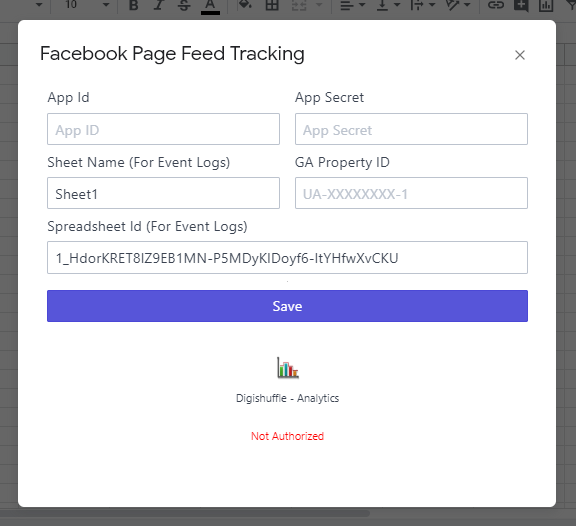
- And Its Done..!!! Now simply Authorize The App. If everything goes well you’ll complete the authorization. (Comment if any errors with screenshot).
- You can now toggle the facebook pages you want to track.
- To Test, you can simply go to your facebook page & perform any actions on the feed. (like, share, comment on the post, add new post etc.) & check if they are logged in sheet (You can change the log sheet by changing the event logging sheet in the last step)
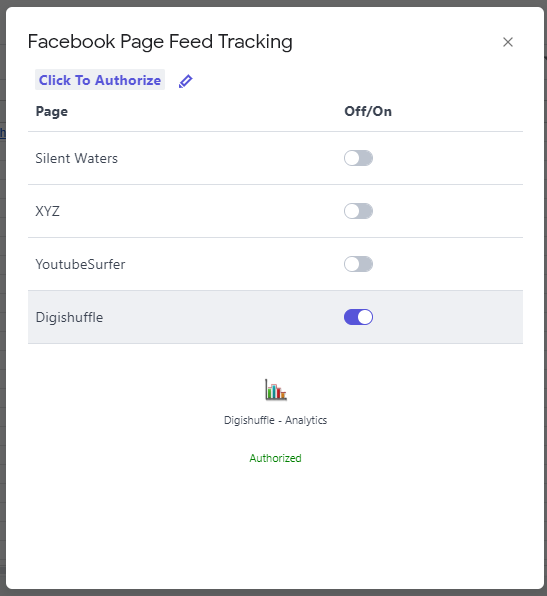
Now the data will get logged to google sheets in real time. To disable
- Sheet logging: Simply toggle the switch off.
Also, you can toggle off to turn off page feed tracking anytime Or click Reset (FB feed > Reset), if you want to entirely reset the app. (You’ll have to start by entering the app id and secret again.)
Lastly, Don’t forget to experiment.
Pingback: education
Thanks a lot..!!! No, its not paid. I always write when I learn something & share it with others. 🙂
Pingback: education online courses
Try using Disqus. It has its own anti-spam filter.
Pingback: online education degrees
I too dislike .net. PHP is better in many ways. Any reason your coder wants to switch? maybe he is good in .net than php
Hey Ritwik,
Thanks for the great explanation, but I think the instructions may be outdated as FB introduced the newer version of the API, which is v2.9. I get this error while I try to authorize the web app on Facebook, with a 400 status code.
Could you give it a try with the v2.9 version of the API and may be update this post?
Btw, domain name has a typo in this line:
Enter ‘scripts.google.com’ in App Domains
Should’ve been script.google.com.
Thanks anyway!
Hey JamRock,
Thanks for the message,
I guess API v2.3 is getting closed. I ran through all the steps & they are working fine.
400 status code error is when tokens are expired. Run reset() function & then authorize again. Also, check the page name if entered correctly. Check if any one of the steps are missed.
Yes, i’ll surely update it with v2.9 & thanks for the correction. Its updated!!!!
there are some mistakes message below, when i try to authorize with facebook
Request failed for https://graph.facebook.com/v2.8//subscribed_apps returned code 404. Truncated server response: {“error”:{“message”:”(#803) Some of the aliases you requested do not exist: subscribed_apps”,”type”:”OAuthException”,”code”:803,”fbtrace_id”:”HFr6e… (use muteHttpExceptions option to examine full response). (line 95, file “Code”)
Hi Ritwik:
I have done thorough evey step you have write in the blog post.
I still can’t get the correct authorization from facebook.
It return below error:
Request failed for https://graph.facebook.com/v2.8//subscribed_apps returned code 404. Truncated server response: {“error”:{“message”:”(#803) Some of the aliases you requested do not exist: subscribed_apps”,”type”:”OAuthException”,”code”:803,”fbtrace_id”:”DH1A0… (use muteHttpExceptions option to examine full response). (line 95, file “Code”)
Any idea what might the reason behind it?
Thanks
Hi Neo,
Kindly Recheck steps #4,#5,#6. Facebook Needs Login Plugin For Authentication
Thanks
Hi Ritwik:
I have done thorough evey step you have write in the blog post.
I still can’t get the correct authorization from facebook.
It return below error:
Request failed for https://graph.facebook.com/… returned code 404. Truncated server response: {“error”:{“message”:”(#803) Some of the aliases you requested do not exist: subscribed_apps”,”type”:”OAuthException”,”code”:803,”fbtrace_id”:”DH1A0… (use muteHttpExceptions option to examine full response). (line 95, file “Code”)
Any idea what might the reason behind it?
Thanks
•Reply•
Hi Neo,
Facebook Now need Login plugin for authentication. Kindly Recheck steps #4,#5,#6.
Thanks
I will try that, Thanks for your reply.
Hi Ritwik:
After doing everything from your post.
I got stucked with Step 5. I can’t get Facebook Authorized, and can’t get the code.
Here is the message i received after i click authorize.
”
Sorry, something went wrong.
We’re working on getting this fixed as soon as we can.”
Bummer!
Anybody have the same problem?
Hello Ritwik,
I’m getting a slightly different error when attempting to authorize the app. It reads…
“Submit for Login Review. Some of the permissions below have not been approved for use by Facebook. Submit for review now or learn more.”
Any idea what could be causing this? Do I need to submit the app?
Thanks.
Hi @disqus_Y6HMw5pSgw:disqus ,
Actually we have not made the facebook app public, which you can do so in App Review > Make it public.
We are using the setup for our own purposes, so you can ignore the error & continue the auth process.
Hey @Rit@ritwikb:disqus ,
Okay, I’ve done as you suggest but now I’m getting a different error…
“Request failed for https://graph.facebook.com/v2.10//subscribed_apps returned code 404. Truncated server response: {“error”:{“message”:”(#803) Some of the aliases you requested do not exist: subscribed_apps”,”type”:”OAuthException”,”code”:803,”fbtrace_id”:”DPPLt… (use muteHttpExceptions option to examine full response) (line 104, file “Code”)”
I see that you addressed this same error over at GitHub and suggested that the person revisit steps 4, 5 & 6. I’ve done the same but I’m still getting the error.
Any ideas where I could be getting hung up?
Thank you.
I have the exact same error. I follow the exact video steps, don’t know what is the problem…..
Error message:
Request failed for https://graph.facebook.com/v2.10//subscribed_apps returned code 404. Truncated server response: {“error”:{“message”:”(#803) Some of the aliases you requested do not exist: subscribed_apps”,”type”:”OAuthException”,”code”:803,”fbtrace_id”:”A+jEr… (use muteHttpExceptions option to examine full response). (line 105, file “Code”)
Any idea what is the problem?
Hi Ritwik:
Thank you for the video.
I am having problems with Step 5, I can’t get Facebook Authorization Process successfully. It is the same error like before. I have follow exact same steps you have write in your blog and this video.
The error message is below:
Request failed for https://graph.facebook.com/v2.10//subscribed_apps returned code 404. Truncated server response: {“error”:{“message”:”(#803) Some of the aliases you requested do not exist: subscribed_apps”,”type”:”OAuthException”,”code”:803,”fbtrace_id”:”A+jEr… (use muteHttpExceptions option to examine full response). (line 105, file “Code”)
Any idea what is the problem?
Request failed for https://graph.facebook.com/v2.10//subscribed_apps returned code 404. Truncated server response: {“error”:{“message”:”(#803) Some of the aliases you requested do not exist: subscribed_apps”,”type”:”OAuthException”,”code”:803,”fbtrace_id”:”FaGyK… (use muteHttpExceptions option to examine full response) (line 105, file “Code”)
Can you help me?
I already follow to step 4.
In step 5, get token, i have this error.
My app current in API v2.12
I have the same problem. Can’t track Facebook likes & comments
Request failed for https://graph.facebook.com/v2.10/176648859610543/subscribed_apps returned code 403. Truncated server response: {“error”:{“message”:”(#200) Access to this data is temporarily disabled for non-active apps or apps that have not recently accessed this data due t… (use muteHttpExceptions option to examine full response). (line 105, file “Code”)
Above is the error code, can you help me?
Thanks
The Access has been blocked by facebook for new apps due to recent events.
Check here for more info: https://developers.facebook.com/status/issues/205942813488872/
Amazing tips Rit for Facebook users to telecast live. Recently my friends stop working Facebook app and cannot live I searched over internet and tried many websites to find out a solution for my friend’s Phone. Finally I found your page to solve the problem and tried your tips to handle the problem. know the phone o friend working fine with your tips to solve Facebook problems. Thanks for sharing such a good post about Facebook live problem solution. Now My friend can live easily and can share photos of my carved wooden furniture site and Facebook page https://www.facebook.com/birchii directly to customers easily. Thanks for starting such a great blog for me and the World.
Hello. where can I find the GA property ID (UA-xxxxxxxx-x)?
Hello, thank you for this article. I have a question and also a problem I ran into.
1. What if I want to track comments for a personal profile and not page? What would I put in as the Page ID?
2. I tried going to the Web App URL and it says, “sorry we are unable to open the file at this time”
Please help
I have problem is here… still loading
Can you help me fix it https://uploads.disquscdn.com/images/0379beea5666c411ccbe7ed852ead09154acd27cfe83b8158a110f49b343c5d2.png
First of all thank you for this wonderful page easy to understand and very informative too.
Through your page i want to share something which i found through a google search that is related to Recurring Payments API Integration it is very effective because Integrating recurring payments is a great way to improve cash flow and simplify billing for businesses With the recurring payment model, businesses don’t have to chase late payments or send out reminders to customers with each billing cycle.
There are so many benefits we have to get through that platform so i am glad to share it with you please check it out.
recurring-payments-api-integration
Once again very much thankful to this page so that I can share my thoughts
data-api
here I share something useful topic and I have given the link so that visitors get the benefits and get knowledge about that platform please once check it out
Thank you for the valuable information on the blog.I am not an expert in blog writing, but I am reading your content slightly, increasing my confidence in how to give the information properly. Your presentation was also good, and I understood the information easily.
for more information please visit the https://1stepgrow.com/advance-data-science-and-artificial-intelligence-course/website.
Hi
thanks for the informative post.Unlock your brand's potential with Calgary social media optimization . Enhance engagement, boost visibility, and drive growth through tailored strategies that connect you with your target audience effectively.